 Generate combinations
This command allows to the safety factors and the partial coefficients for the automatic generation of load combinations as per Eurocode.
The Self-weight override option permits to apply a different coefficient to self-weight loadcase, as requested by some codes (e.g. Italian regulations).
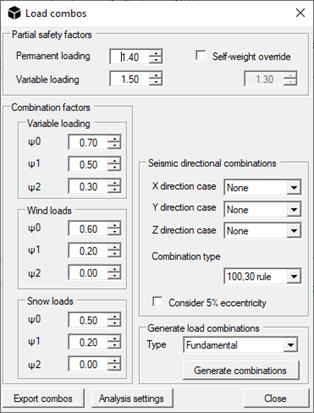
The calculated combinations can be edited from the Analysis settings command.
 Analysis settings: Defines the type and the sequence of the analyses. The combinations can be defined adding linear load cases to a defined case. To add an analysis, select an Analysis mode, an Analysis type and, if needed, a Combination type. Then click on Add.
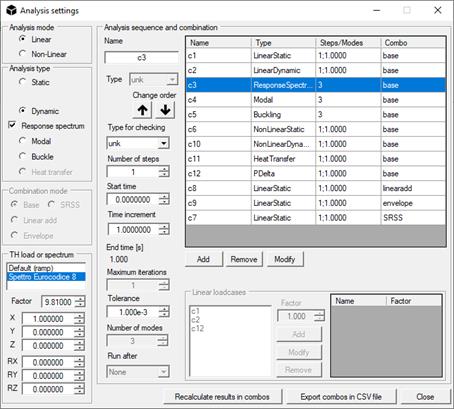
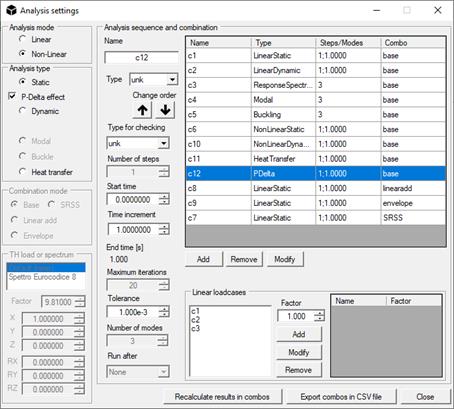
The program allows the following types of linear and non-linear analysis:
- Static
- Dynamic
- Response spectrumanalysis (user must check Dynamic first, and the option Response spectrum. Hence, a design spectrum can be selected from the TH load or spectrum box)
- Modal, to find structural periods and eigen-vectors of a model;
- Buckle, to find the buckling modes of a model;
- Heat transfer, to analyze models in XY plane and to get thermal maps (for example from a section);
- P-Delta, for static analysis including second-order geometrical effects. Such kind of analysis are carried-out iteratively, but in only one loading step, and results can be used in combinations. To include second order geometrical effects in multi-steps non-linear analyses, flag the option named “2nd order”.
In the Combination mode box, user can choose the type of combination to be performed:
- Base for all the linear static load cases
- Sum for the load combinations in which the cases specified in the Linear loadcases box have to be summed;
- Envelope for the load combinations in which the cases (or combinations) specified in the Linear loadcases box have to be enveloped;
- SRSS to perform a Square Root of the Sum of Squares of the cases (or combinations) specified in the Linear loadcases box.
From the Type drop-down menu in the Analysis sequence and combination box, the type of each loadcase or combination can be chosen, for using in checking. If this has not been specified, checking could not be run for the specific combination.
With the command Export combos in CSV file, a CSV file containing all the combinations and their combination coefficient can be obtained in a tabular format.
For dynamic analyses, damping can be specified in terms of Rayleigh’s coefficients, while for the Response Spectrum analysis damping ratio of the spectrum employed is required.
Finally, for applying a displacement history (as defined by imposing displacement) in non-linear analyses, set Factor to 0.